
How to Report Someone in Gakuran
Save evidence first, then choose Roblox's report tools for Roblox rule violations or Gakuran's support report form for a player report related to the game.
Save evidence before you report
Record or preserve the clearest evidence you have before opening a report. For the Gakuran form, the most useful preparation is:
- The player's exact Roblox username, not only a display name.
- A clear video showing the behavior and enough surrounding context to understand what happened.
- A short, factual description of the rule-breaking behavior and where it happened.
Do not add passwords, Discord tokens, session cookies, two-factor codes, or other sensitive account information to any report.
1. Report Roblox rule violations
Use Roblox's own Report Abuse tool when the behavior breaks Roblox rules. Roblox recommends reporting the specific chat, message, experience, person, or other content involved; a profile-only report may not show moderators what the person did.
- While you are in the Gakuran experience, open the Roblox menu and choose the Report option or flag icon.
- Choose Person, select the username, and choose the reason that matches the behavior.
- Add a concise description, then select Submit.
Read the official Roblox instructions for reporting rule violations for the current menus and reporting options.
2. Report through the Gakuran support server
Use the Gakuran support workflow for a player report related to behavior in Gakuran. Keep the video evidence ready and copy the exact Roblox username before you open the form.
- Open the Gakuran support server report channel. Discord may ask you to join the server or sign in first.
- Click Report Player.
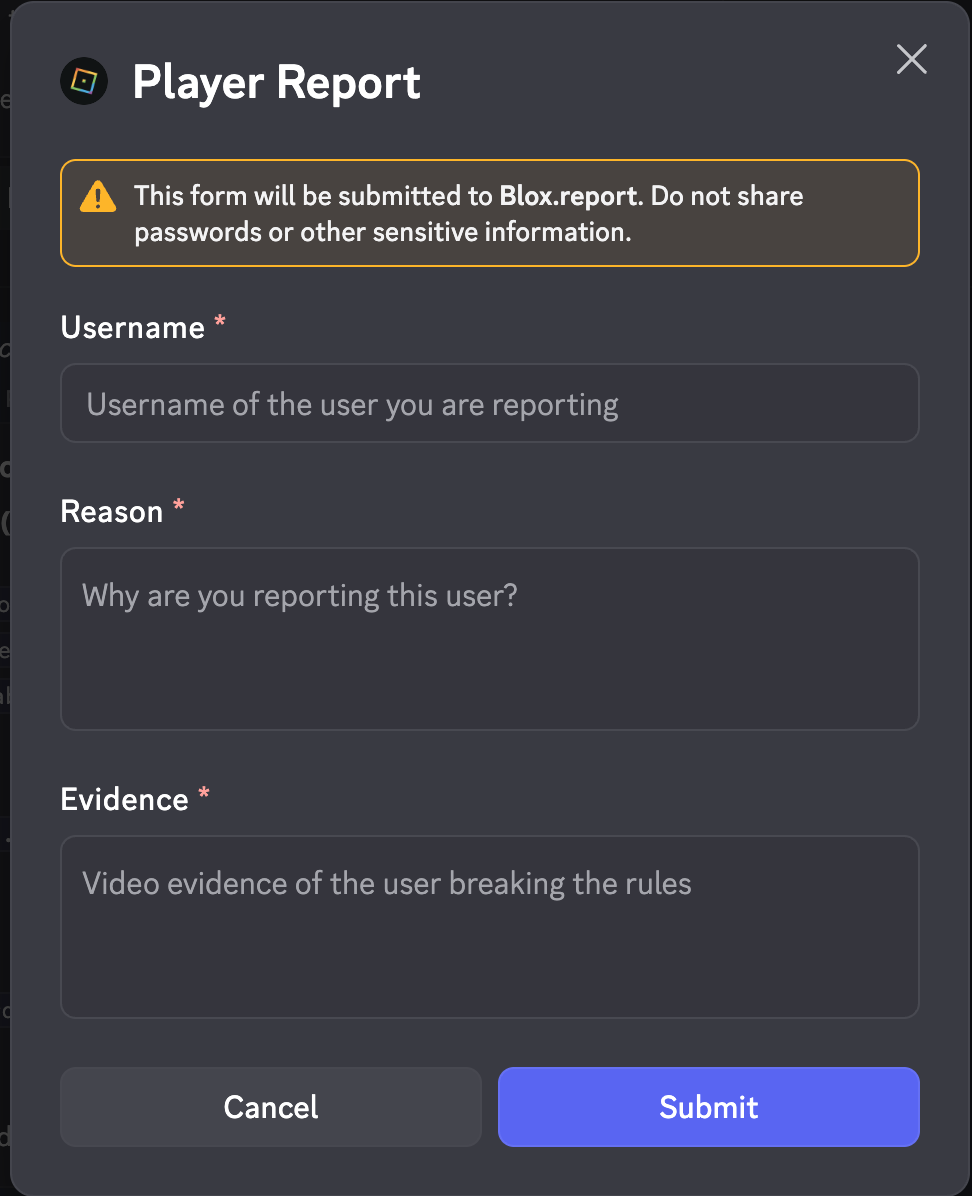
- Fill in the required fields:
- Username: the Roblox username of the player you are reporting.
- Reason: why you are reporting the player.
- Evidence: video evidence of the user breaking the rules.
- Review the details and click Submit.
3. Open the direct Gakuran report form
If you already have the evidence and username ready, you can open the report form directly instead of finding it in the Discord channel:
Open the direct Player Report form
Complete the Username, Reason, and Evidence fields, then submit the report. Check that the address is the Blox.report report page before entering anything, and never submit a password, token, cookie, or other private credential.
Which route should you use?
Roblox report
Use for behavior or content that violates Roblox rules. Report the specific person, chat, or content in Roblox.
Gakuran Discord
Use the Report Player button when the Gakuran team needs to review in-game behavior and you have video evidence.
Direct form
Use the Blox.report URL when you want to open the Gakuran player form directly. The same evidence and privacy rules still apply.
Related Guide Pages
Frequently Asked Questions
- How do I report someone in Gakuran?
- Save the player's exact Roblox username and clear evidence first. Use Roblox's in-experience Report Abuse tool for Roblox rule violations, then use the Gakuran support report channel or the direct Blox.report form for a Gakuran player report.
- Should I report a Gakuran player on Roblox or Discord?
- Use Roblox's report tool when the behavior breaks Roblox rules and report it against the specific chat, person, or content. Use the Gakuran support form when the Gakuran team needs to review the player's behavior in the game. If both apply, you can use both routes.
- What evidence does the Gakuran player report need?
- The Player Report form asks for the reported Roblox username, a reason for the report, and video evidence of the user breaking the rules. Keep the video clear and include enough context for the behavior to be understood.
- Can I open the Gakuran report form without Discord?
- Yes. Open the direct Blox.report player-report URL listed on this page. It uses the same three report fields shown in the Gakuran Player Report form, so prepare the username, reason, and video evidence first.
- Should I include my password or private account information?
- No. The report form warns that submissions go to Blox.report. Never include a Roblox password, Discord token, session cookie, two-factor code, or other sensitive information in a report.